How to Play Finding Meow (Meowdoku): Rules, Controls and a Solved Example
Finding Meow is a cosy logic puzzle with one job: find where every cat sits. The grid is split into coloured regions, and you place exactly one cat in each region, each row and each column, with one twist that makes the whole thing click: cats can't touch, not even at the corners.
People search for this puzzle under a few names. Meowdoku is the most common, because the one-per-row-and-column rule feels like Sudoku. It is really a close cousin of Star Battle, and if you have played a daily Queens puzzle you already know the rules. Whatever you call it, every grid has exactly one solution and can be solved with pure logic. No maths, no luck, no guessing.
This guide covers the three rules, how to control the game on a computer or a phone, what hearts and hints do, and then solves a real level from the game one step at a time.
The three rules
| Rule | What it means |
|---|---|
| 1. One cat per region | Each colour on the board is a region. Every region gets exactly one cat. |
| 2. One cat per row and column | No row and no column may hold two cats. On a 5×5 board you place 5 cats, on a 9×9 board 9. |
| 3. Cats can't touch | The eight cells around a cat (above, below, left, right and the four diagonals) must all be empty. |
Rule 3 is the one that does most of the work. Because a cat blocks its whole row, its whole column and all eight neighbours, one placed cat tells you a lot about the rest of the board.
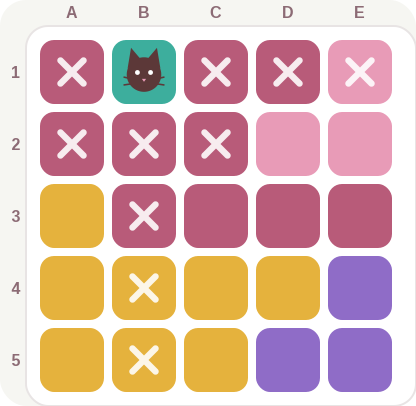
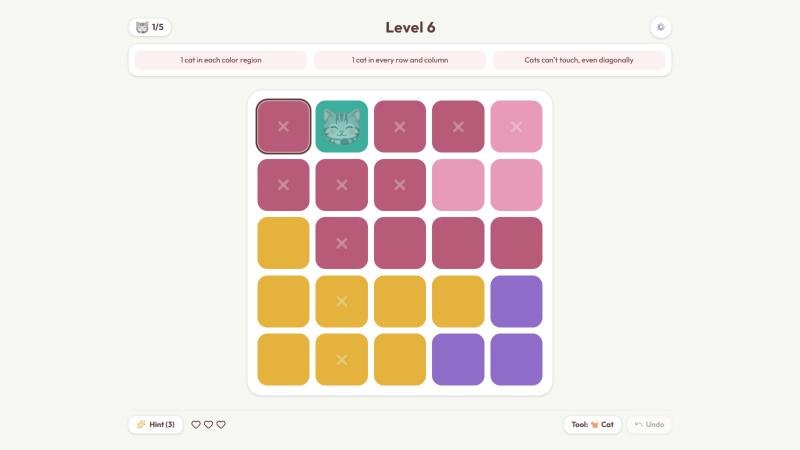
That is Level 6 at the start. The game has placed one cat for you at B1 and marked an X in every cell that cat rules out: the rest of row 1, the rest of column B, and its diagonal neighbours A2 and C2. That is rule 2 and rule 3 in one picture. (Which cat the game gives you can vary: open Level 6 straight after Level 5 and you start with the cat at E2 instead. The regions and the solution are the same either way.)
Cats and X marks
You work with two symbols:
- A cat is a confirmed answer. The game checks it on the spot. If it is right, it is placed and all the cells it rules out are automatically marked with an X. If it is wrong, the cell shakes and you lose a heart.
- An X is your own note that a cat can't go there. You can place and remove X marks freely, and they are never checked. Most of your moves will be X marks. Cats are the reward for a run of good X marks.
The habit that makes the puzzle easy: mark X first, place cats only when you are certain. On a correct cat the game does the follow-up X marks for you, so a cat is never busywork.
Controls
| Computer | Phone or tablet | |
|---|---|---|
| Place or remove an X | Single click | Single tap |
| Place a cat | Double-click | Double tap |
| Remove a cat | Single click or double-click it | Tap it |
| Undo | The Undo button, or Ctrl+Z | The Undo button |
On a keyboard you can also move a highlighted cell with the arrow keys, press Space or Enter to place a cat, X (or M) to mark an X and Backspace to clear a cell.
The game is designed for a widescreen view, so on a phone turn it sideways to landscape. There is nothing to install and no account.
Hearts, hints, timer and saving
- Hearts. You start every puzzle with 3 hearts. Placing a cat on a wrong cell costs one. Lose all three and you get a Try Again screen where you can restart the same puzzle or go back to the menu. The hearts you have left at the end are shown as your Deduction Accuracy, so a clean solve is 100%.
- Hints. You get 3 hints per puzzle. A hint places one correct cat for you (and its X marks). It never costs a heart. Use one when you are stuck rather than guessing, because a guess risks a heart and a hint does not.
- Timer. The clock starts when the board appears and pauses whenever you open the settings menu (the gear button) or switch away from the tab.
- Auto-save. The game saves your board after every move, in your browser. Close the tab mid-puzzle and the menu will offer Resume Saved Level (or Resume Saved Game in Classic) next time. Journey progress is saved too, so you can come back to any level you have unlocked.
Journey mode and Classic mode
Journey is a 50-level campaign that grows with you, one grid size at a time:
| Chapter | Levels | Grid |
|---|---|---|
| 1. Spring Garden | 1 to 10 | 5×5 |
| 2. Summer Naps | 11 to 25 | 6×6 |
| 3. Autumn Leaves | 26 to 38 | 7×7 |
| 4. Winter Frost | 39 to 46 | 8×8 |
| 5. Zen Master | 47 to 50 | 9×9 |
The first five levels start with two cats already placed; from Level 6 on you get one. Finish a level to unlock the next, or open Select All Levels to replay any level you have cleared. Reset Journey on the level map wipes your progress (it asks you to confirm).
Classic gives you a fresh, randomly generated board at any size from 5×5 to 9×9, as many as you like. Every Classic board is checked to have exactly one solution before you see it, just like the Journey levels.
If you are new, play the Journey in order. Spring Garden teaches you the rhythm of the game on small boards before the regions get bigger and more tangled.
A real level, solved step by step
Here is Level 6, the first level with only one cat given. It is the board in the screenshot at the top of this guide. If your game started you with the cat at E2 instead, place a cat on B1 yourself first: teal is a one-cell region, so that cat is free. Every step below still holds; the E2 cat just does step 4 for you early. In the diagrams below, columns are lettered A to E from the left and rows numbered 1 to 5 from the top. The regions are: teal (just the single cell B1), pink (E1, D2, E2), rose (the big shape across the top left and row 3), gold (the bottom left) and lavender (E4, D5, E5).
Step 1: the rose region is stuck in one row. The cat at B1 has already X'd out most of the rose region. Its only free cells are C3, D3 and E3, all in row 3. So the rose cat is in row 3, which means no other region can have a cat in row 3. A3 gets an X.
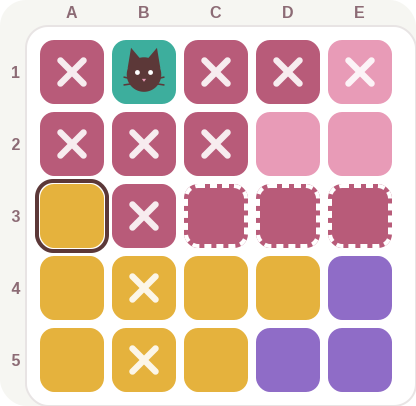
Step 2: column A belongs to one region. Look down column A. After step 1, its only free cells are A4 and A5, and both are gold. Column A needs a cat somewhere, so the gold cat must be in column A. That rules out every other gold cell: C4, D4 and C5 get an X.
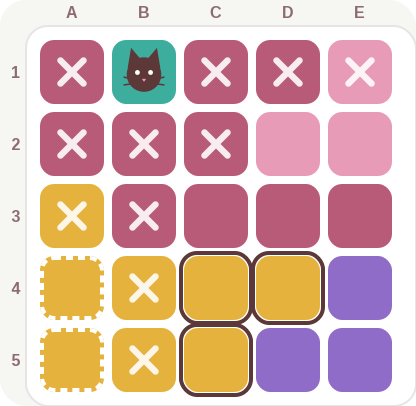
Step 3: a column with one cell left. Column C now has a single free cell, C3. A column must have a cat, so the cat goes at C3. The game marks its row, column and neighbours for you: D3 and E3 (the rest of row 3) and D2 (a diagonal neighbour).
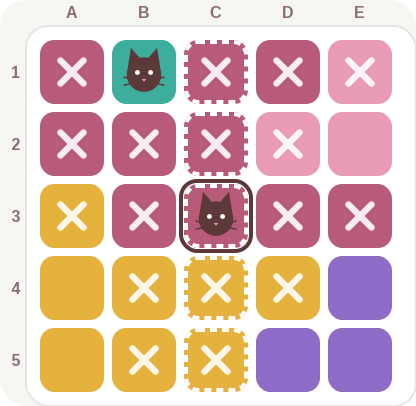
Step 4: the pink region is down to one cell. With D1 and D2 ruled out, the pink region only has E2 left. Cat at E2. That X's out E4 and E5, the rest of column E.
Step 5: the lavender region is down to one cell. E4 and E5 are gone (column E now has its cat), so lavender only has D5 left. Cat at D5.
Step 6: the last cat. The gold region has one free cell, A4. Cat at A4. Five cats, one in every region, row and column, none touching.
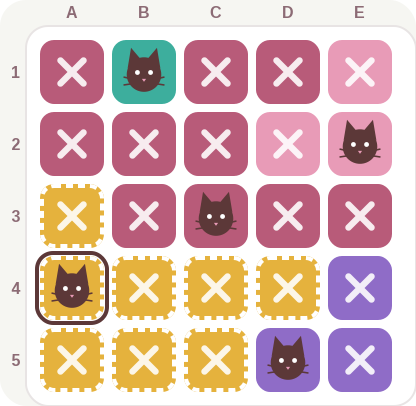
Notice that we never guessed. Every step was either this region is squeezed into one line, this line only has one region left in it, or this region or line has one cell left. Those three ideas solve every Spring Garden level and most of Summer Naps.
Five tips for beginners
- Start with the smallest region. Every level has at least one tiny region, often a single cell. A one-cell region is a free cat; a two-cell region nearly is.
- After every cat, re-scan. A new cat removes up to a dozen cells. Something that was wide open a moment ago is usually now down to one cell.
- Count free cells in each region, row and column. Anything at one is a cat. Anything at two or three is worth a closer look: are they all in one line?
- Never place a cat to "see what happens". A wrong cat costs a heart; an X costs nothing. If you are unsure, mark more X's or spend a hint.
- Use Undo generously. It steps back through your X marks too, so you can explore a line of thought and rewind it.
When the 7×7 and 8×8 boards of Autumn Leaves and Winter Frost stop falling to these moves, read our Finding Meow strategy guide. It adds the techniques you need for big grids, including the one that cracks almost every stuck position: asking which cells would leave another region with nowhere to go.
Frequently asked questions
Is Finding Meow the same as Meowdoku? Yes. Finding Meow is our version of the cat logic puzzle usually called Meowdoku: one cat per coloured region, row and column, and no two cats touching.
How is it different from Sudoku? Sudoku fills every cell with a digit. Here you place a single cat per region, row and column, and the cells around each cat must stay empty. The feel is closer to Star Battle, or the Queens puzzle, than to Sudoku.
Can every puzzle be solved without guessing? Yes. Every Journey level and every Classic board is generated with exactly one solution and checked before it is shown, so there is always a logical next move.
What happens when I lose all three hearts? You see a Try Again screen. Restart the same puzzle, or exit to the menu. Nothing else is lost, and Journey progress stays.
Do I lose progress if I close the browser? No. Your current board, your unlocked levels and your sound setting are saved in the browser you are using. Progress does not sync between devices.
Is it free? Yes. Finding Meow is free to play in your browser with no download, no account and no in-game purchases.