Neon Blocks Guide: Controls, Scoring, Speed Levels and Block Stacking Tips
Neon Blocks is a falling block puzzle game in the style of the classic line-clearing games, with a glowing cyberpunk look. Pieces made of four blocks drop into a 10-wide, 20-tall well. Fill a whole row and it clears. Let the stack reach the top and the game is over.
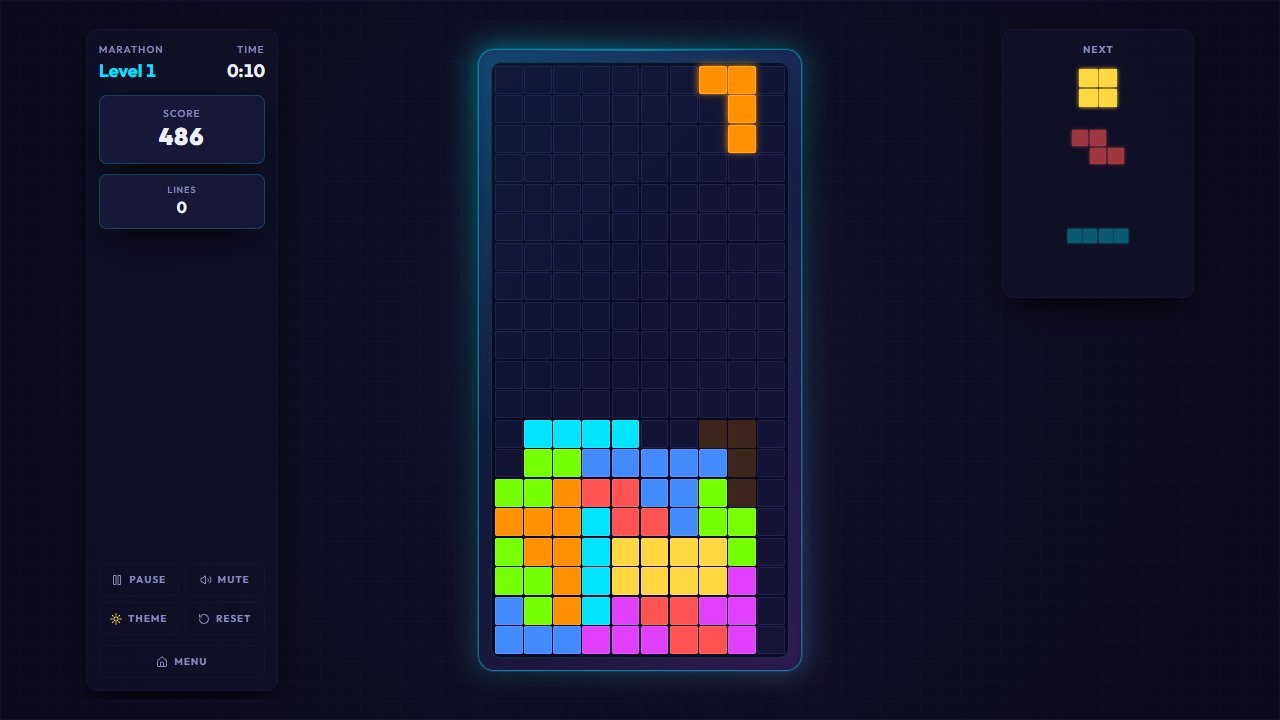
It's easy to start and hard to master, because the pieces keep getting faster. This guide covers the real controls, the exact scoring table, how quickly each level speeds up, and the stacking habits that let you survive longer and score more lines.
All numbers below come straight from the game itself.
How to play Neon Blocks
Neon Blocks runs in your browser on a computer, phone or tablet. There is nothing to download and no account.
- Pick a mode from the main menu: Marathon or Sprint.
- Pieces fall from the top one at a time. Move them left and right and rotate them to fit the gaps.
- Fill a whole row with no gaps and it clears. Everything above drops down one row.
- Clearing two, three or four rows with one piece scores far more than clearing them one at a time.
- The game ends when a new piece has no room to appear at the top of the board.
There are seven pieces, named after the letters they look like: I (the long straight piece), O (the square), T, S, Z, J and L.
The two modes
| Mode | Goal | What counts |
|---|---|---|
| Marathon | Endless. Survive as long as you can while the speed climbs | Your score |
| Sprint | Clear 40 lines as fast as you can | Your time |
In both modes the level goes up every 10 lines, and the pieces fall faster at each level. In Sprint the game stops the moment you reach 40 lines. Your best Marathon scores and best Sprint times are shown on the menu cards.
Keyboard controls
| Key | Action |
|---|---|
| Left arrow or A | Move left |
| Right arrow or D | Move right |
| Down arrow or S | Soft drop (move down one row) |
| Space | Hard drop (drop straight down and lock instantly) |
| Up arrow, W or X | Rotate clockwise |
| Z | Rotate anticlockwise |
| P or Esc | Pause and resume |
Having both rotation directions matters more than it sounds. An L piece that needs to turn three times clockwise only needs one press of Z.
Touch controls on a phone
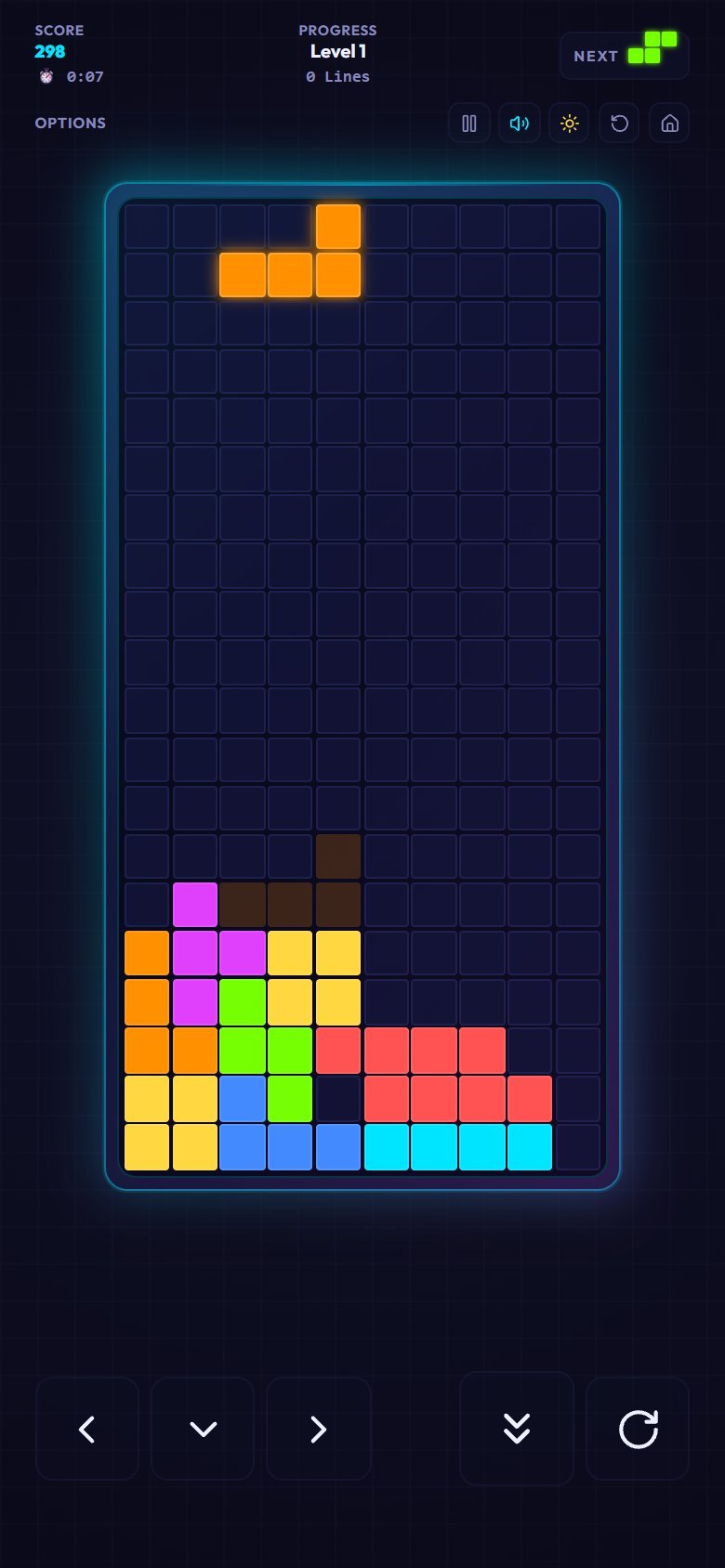
On a phone held upright, five buttons appear under the board:
- Left, Down and Right on the left side. Hold Left or Right and the piece slides along: one move straight away, a short pause, then a quick repeat. Hold Down to keep soft dropping.
- Hard drop (the double arrow) and Rotate (clockwise) on the right side.
The top bar shows your score, time, level, lines and the next piece, plus buttons for pause, sound, light or dark theme, restart and the menu.
Helpful things on screen
- The ghost piece. A faint outline on the board shows exactly where your piece will land if you hard drop. Use it to line up every drop.
- The Next panel. On a computer you see the next three pieces, with the first one brightest. On a phone you see the next one.
- Lock delay. When a piece touches down it doesn't lock straight away. You get half a second to slide or rotate it, and each successful move restarts that half second, up to 15 times per piece. This is how you tuck a piece under an overhang.
- Fair piece order. The game shuffles all seven pieces into a "bag" and deals them out before shuffling a new bag. So you'll never see more than 12 other pieces between two of the same shape, including the long I piece.
- Wall kicks. If a rotation would push the piece into a wall or another block, the game tries a few nearby positions and uses the first one that fits. Pieces can often rotate right next to a wall or slip into tight spots.
- Auto-pause. If you click away from the game window, it pauses itself.
How scoring works
Line clears are worth a fixed number of points multiplied by your current level. The level is the one you were on when the piece locked, so a clear that pushes you up a level is still scored at the old level.
| Clear | Points | At level 1 | At level 5 | At level 10 |
|---|---|---|---|---|
| Single (1 line) | 100 × level | 100 | 500 | 1,000 |
| Double (2 lines) | 300 × level | 300 | 1,500 | 3,000 |
| Triple (3 lines) | 500 × level | 500 | 2,500 | 5,000 |
| Quad (4 lines) | 800 × level | 800 | 4,000 | 8,000 |
| T-Spin Mini (with a line) | 100 × level | 100 | 500 | 1,000 |
| T-Spin Single | 800 × level | 800 | 4,000 | 8,000 |
| T-Spin Double | 1,200 × level | 1,200 | 6,000 | 12,000 |
| T-Spin Triple | 1,600 × level | 1,600 | 8,000 | 16,000 |
On top of that:
- Hard drop: 2 points for every row the piece falls.
- Soft drop: 1 point per row, but these points are only added when that piece clears a line (or counts as a T-spin). If it doesn't, they're lost.
The name of each clear flashes up on screen: SINGLE, DOUBLE, TRIPLE, QUAD!, or the T-spin type.
What the table tells you. Four singles are worth 400 × level. One quad is worth 800 × level. That's double the points for the same four lines. Two doubles (600) also lose to one quad. So the biggest single way to score more is to clear lines four at a time.
Note that there is no combo or back-to-back bonus in the scoring. Each clear is scored on its own.
Level and speed progression
You go up one level for every 10 lines you clear. Level 1 starts with 0 lines, level 2 at 10 lines, level 3 at 20, and so on.
The speed is the time a piece takes to fall one row on its own:
| Level | Lines needed | Time per row | Roughly |
|---|---|---|---|
| 1 | 0 | 1.00 s | One row a second |
| 2 | 10 | 0.79 s | |
| 3 | 20 | 0.62 s | |
| 4 | 30 | 0.47 s | About 2 rows a second |
| 5 | 40 | 0.36 s | |
| 6 | 50 | 0.26 s | About 4 rows a second |
| 7 | 60 | 0.19 s | |
| 8 | 70 | 0.13 s | |
| 9 | 80 | 0.09 s | About 11 rows a second |
| 10 | 90 | 0.06 s | |
| 11 | 100 | 0.04 s | |
| 12 | 110 | 0.03 s | |
| 13+ | 120+ | 0.02 s | The top speed: 50 rows a second |
The curve is gentle for the first few levels and then gets steep fast. From about level 8, pieces cross the whole board in under three seconds. By level 13 they're at top speed and fall almost instantly, so the half-second lock delay becomes your main time to adjust.
That's why scoring and survival go hand in hand. Every quad you clear at level 10 is worth ten times what it was at level 1, but you need clean, fast stacking to get there.
In Sprint, 40 lines only takes you to level 4 before the game ends, so the speed stays comfortable. Sprint is about efficiency, not reflexes.
Block stacking tips: build a good stack
1. Keep it flat
A flat, even surface accepts almost any piece. A bumpy surface with tall spikes and deep pits only accepts one or two. Before each drop, ask: "Will this leave the surface flatter or bumpier?"
- Try to keep neighbouring columns within one or two rows of each other.
- Avoid single-wide pits more than two deep anywhere except your well (see below). Only the I piece can fill them.
2. Never bury holes
A hole is an empty cell with blocks above it. You can't fill it until you clear every row above it. Holes are what turn a calm game into a panic.
- Use the ghost piece to check that nothing will hang over an empty cell.
- If a hole seems unavoidable, put it as close to the top as possible so it's quick to dig out.
- Lock delay lets you slide a piece sideways after it lands. That's how you tuck an S, Z or T under a ledge to fill a gap that's already covered.
3. Keep a well for the I piece
This is the core technique for scoring quads.
- Pick one column at the edge, usually the far left or far right.
- Stack the other nine columns flat and leave that column empty.
- When your stack is four rows high with the well still open, drop an I piece upright into the well. Four lines clear at once: a QUAD!
An edge well is easier than a middle one because the rest of your stack is one big flat area instead of two small ones.
Thanks to the piece bag, you never get more than 12 other pieces between two I pieces. A four-row stack only needs about nine other pieces (four rows of nine cells is 36 cells, at four cells a piece), so the timing usually works out.
4. Use the preview to plan two moves ahead
You can see the next three pieces on a computer. Use them.
- If an I piece is coming next, finish flattening and keep the well clean.
- If an S or Z is coming, leave a matching step for it now.
- If you know where the next piece will go, place the current one so it doesn't block that spot.
5. Know where each piece fits best
| Piece | Fits best |
|---|---|
| I | Your well (upright), or across a flat area (flat) |
| O | Any flat area two wide. Never on a step, or it leaves a hole |
| T | Bumps and dips. The most flexible piece after the I |
| S and Z | Steps one row high. S fits a step rising to the right, Z a step rising to the left |
| J and L | Corners, walls, and filling the side next to your well |
S and Z are the pieces that cause the most holes. Always leave at least one place on your stack where each can land flat, if you can.
6. Rotate early, then move
Decide the final rotation as soon as the piece appears, rotate it, then slide it into place. Rotating while sliding means more key presses and more mistakes, especially at higher levels. Remember Z turns anticlockwise in one press.
T-spins: are they worth it?
Neon Blocks does detect and reward T-spins. When a T piece locks, the game checks the four corners around its centre. If at least three are blocked, it's a T-spin. If both corners on the side the T points towards are blocked it's a full T-Spin, otherwise it's a T-Spin Mini.
The payoff is big. A T-Spin Double is worth 1,200 × level, more than a quad (800 × level), for only two lines. A T-Spin Triple is worth 1,600 × level.
But you only score T-spin points if the T piece also clears at least one line. A T-spin with no lines cleared scores nothing.
The usual setup is a T-shaped slot covered by an overhang, so the T can only get in by rotating at the last moment. Wall kicks are what let it twist into the slot.
For most players, here's the honest advice:
- Beginners: ignore T-spins. Flat stacking and quads will raise your score more.
- Confident players: start practising T-Spin Doubles at low levels in Marathon, while the speed still gives you time to build the slot. At high levels the points are huge.
Sprint mode strategy
Sprint is a different game. Score doesn't matter, only time.
- Hard drop everything. Waiting for pieces to fall wastes seconds. Line up with the ghost piece, then press Space.
- Don't chase quads at all costs. Waiting for the perfect I piece can cost more time than a few doubles and triples.
- Keep it flat and keep moving. Hesitation is the real enemy. A slightly imperfect placement now beats a perfect one in three seconds.
- Learn both rotations. Using Z for anticlockwise saves two presses every time.
Beginner mistakes to avoid
- Stacking in the middle. Building a tower in the centre leaves deep gaps on both sides that only I pieces can fill. Spread pieces across the whole width.
- Hard dropping without checking the ghost. At high speed one careless Space press can bury a hole. Glance at the ghost piece first.
- Filling the well with the wrong piece. When you get nervous, it's tempting to drop a J or L into the well. That ruins your quad. Only do it if the stack is getting dangerously high.
- Letting the stack creep up. Above halfway, you have very little time to react. When the stack gets tall, stop building quads and clear singles and doubles until it's back down.
- Forgetting the lock delay. A piece that touches down isn't locked yet. You still have half a second to slide it.
- Soft dropping for points. Soft drop gives only 1 point a row, and only if the piece clears a line. Hard drop gives 2 a row every time.
Frequently asked questions
Is Neon Blocks free? Yes. Neon Blocks is a free block game online. It runs in your browser with no download and no sign-up.
Can I play on my phone? Yes. On a phone held upright, touch buttons appear under the board for left, right, soft drop, hard drop and rotate. Holding left or right slides the piece quickly.
How do I score more lines? Keep your stack flat, avoid holes, and keep one column empty at the edge as a well. When the rest of the stack is four rows high, drop an I piece into the well for a quad. A quad is worth twice as much as four single lines.
What is the highest-scoring move? A T-Spin Triple, at 1,600 × your level. A T-Spin Double (1,200 × level) also beats a quad (800 × level). For most players, though, the quad is the reliable big scorer.
How fast does it get? Pieces start at one row a second and speed up every 10 lines. By level 9 they fall about 11 rows a second, and from level 13 (120 lines) they hit the top speed of 50 rows a second.
Is there a hold piece? No. There's no hold button in Neon Blocks, so plan with the next-piece preview instead. On a computer you can see three pieces ahead.
What is the difference between Marathon and Sprint? Marathon is endless and you're chasing a high score as the speed climbs. Sprint ends as soon as you clear 40 lines, and your time is what counts.
Are my scores saved? Yes. Your best scores and Sprint times are saved in your browser on the device you play on, and shown on the menu.
Quick checklist
- Keep the stack flat and spread across the whole width.
- Never bury holes. Check the ghost piece before every hard drop.
- Keep a well at one edge and save it for the I piece.
- Quads score double what four singles do.
- Look at the next three pieces and plan ahead.
- Rotate first, then move. Use Z for anticlockwise.
- When the stack gets tall, stop building and clear lines.
If you like tidy, logical puzzles, try our Wood Block Sudoku strategy guide or learn how to play Binairo. For a one-button test of timing, see our Skyline Stack tips.
Ready to stack? Neon Blocks is free in your browser, with Marathon and Sprint modes and touch controls for your phone.