How to Play Sudoku: Rules, Beginner Tips and the Strategies That Solve Most Puzzles
Sudoku is a number puzzle, but you don't need to be good at maths. You never add anything up. The numbers 1 to 9 are just nine different symbols, and the whole game is about logic: working out where each one can and can't go.
This guide covers the rules, how to play in Zen Haven Sudoku, our free browser version, and the solving techniques that take you from your first Easy grid to Hard and Expert puzzles. Each technique comes with a small worked example.
The rules of Sudoku
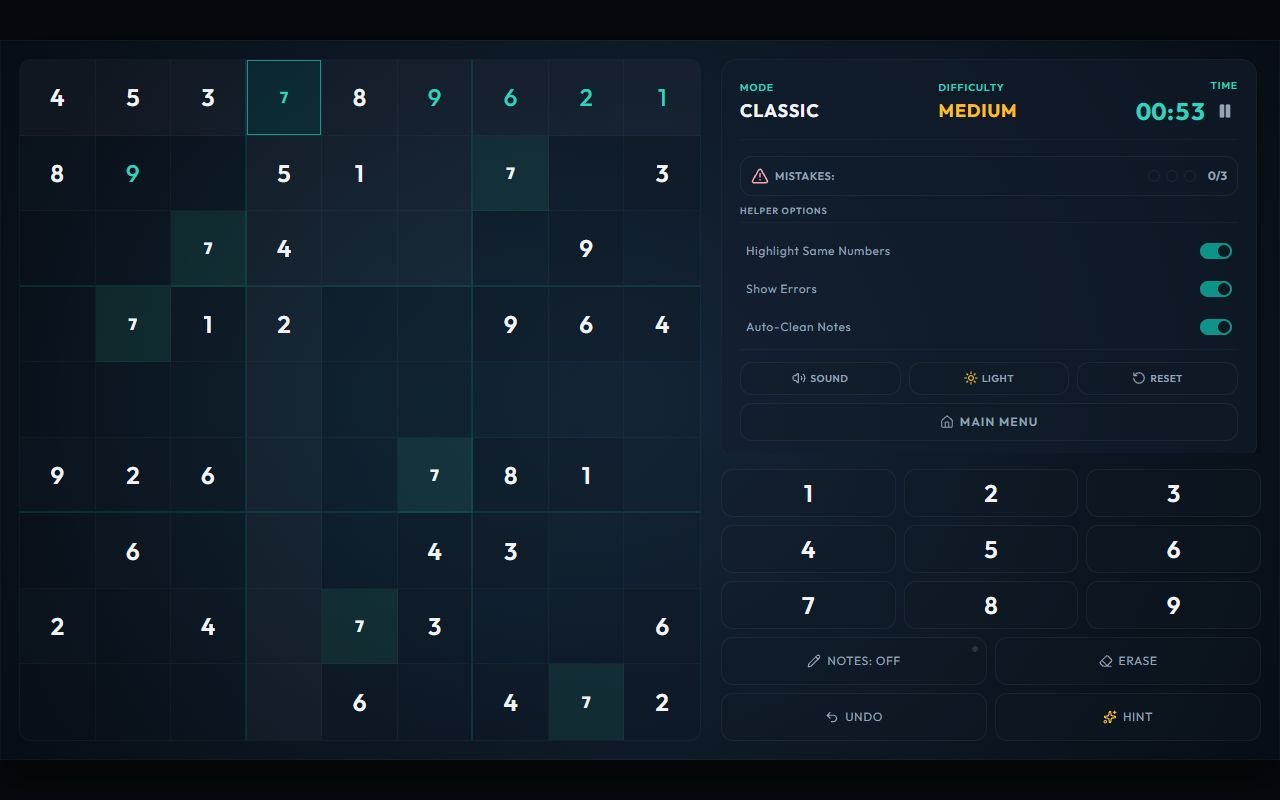
A Sudoku grid has 81 cells, arranged in 9 rows, 9 columns and nine 3×3 boxes (the squares marked out by the thicker lines). Some cells start filled in. Your job is to fill in the rest.
There is only one rule, applied three ways:
| Unit | The rule |
|---|---|
| Every row | Must contain each digit from 1 to 9 exactly once |
| Every column | Must contain each digit from 1 to 9 exactly once |
| Every 3×3 box | Must contain each digit from 1 to 9 exactly once |
That's it. Because each unit has nine cells and nine digits, "no repeats" and "every digit once" mean the same thing. If a 7 is already in a row, no other cell in that row can be a 7.
A good Sudoku has exactly one solution. Every puzzle in Zen Haven is checked for this when it is made, so you never need to guess. There is always a logical reason for the next number.
How to play Zen Haven Sudoku
Zen Haven Sudoku runs in your browser on a computer, phone or tablet. There is nothing to download and no account. It is laid out for a wide screen, so on a phone, turn it sideways: in portrait you'll see a prompt asking you to rotate to landscape.
Two ways to play
- Journey Mode is a path of 50 stages split into four chapters. Each stage unlocks the next one when you finish it. The stages are the same for every player.
- Classic Play gives you a fresh, random puzzle at the difficulty you choose.

| Difficulty | Starting clues (Classic) | Journey chapter |
|---|---|---|
| Easy | about 42–46 | Chapter 1: Spring (stages 1–10) |
| Medium | about 33–37 | Chapter 2: Summer (stages 11–25) |
| Hard | about 26–30 | Chapter 3: Autumn (stages 26–40) |
| Expert | about 21–24 | Chapter 4: Winter (stages 41–50) |
Fewer clues means fewer starting points and harder logic. Finish all 50 stages and the menu shows a Journey Completed badge, and you can go back and replay any chapter.
Placing numbers
- Tap or click a cell to select it. Its row, column and box are shaded so you can see what it "sees".
- Tap a digit on the keypad (1 to 9), or press the number keys on a keyboard.
- Starting clues are fixed and can't be changed.
The panel on the right shows the mode, the difficulty or stage, and a timer with a pause button next to it.
Notes (pencil marks)
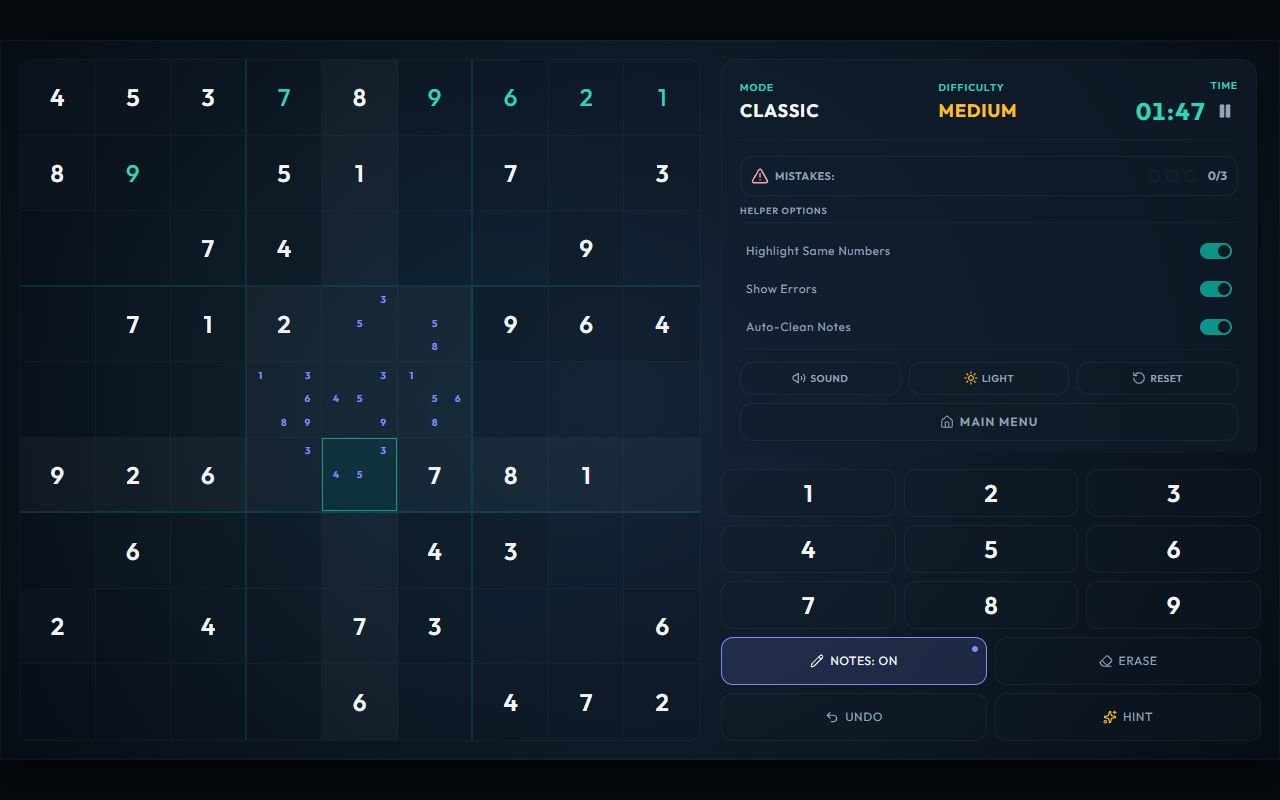
Tap Notes: OFF to switch it to Notes: ON (or press N). Now tapping a digit adds a small pencil mark to the cell instead of placing an answer. Tap the same digit again to remove it. Each cell shows its notes in a mini 3×3 grid, so a 1 always sits top-left and a 9 bottom-right.
With Auto-Clean Notes turned on, placing a number automatically removes that digit from the notes in its row, column and box. This saves a lot of tidying up.
Mistakes, hints and the other buttons
- Mistakes: a number that doesn't match the solution counts as a mistake, even if it doesn't clash with anything yet. The mistake counter shows three dots. Three mistakes and the puzzle ends with a "Try Again" screen, where you can restart the puzzle or exit. With Show Errors on, wrong numbers turn red.
- Erase clears the selected cell, both the number and any notes (Backspace or Delete on a keyboard).
- Undo steps back one move (U or Ctrl+Z). On a keyboard you can also redo with Y or Ctrl+Y. Undoing a wrong number removes it from the grid, but the mistake still counts.
- Hint fills in the correct number for the selected cell if it's empty or wrong. If no cell is selected, or the selected one is already right, it picks the first empty or wrong cell from the top-left. Hints don't count as mistakes (press H on a keyboard).
- Highlight Same Numbers shades every cell holding the same digit as the one you've selected. Great for scanning.
- Reset restarts the current puzzle from scratch, including the timer and mistakes.
- Sound and Light / Dark switch the chimes and the theme. Main Menu takes you back.
Keyboard shortcuts: 1–9 place a digit, the arrow keys move around the grid (they wrap round the edges), Backspace or Delete erases, N toggles notes, U undoes, Y redoes and H gives a hint.
Your game saves automatically in your browser. Leave and come back later, and the menu shows Resume Level X for Journey or Resume Saved Game for Classic. The game also pauses itself if you switch to another window.
When you finish, the Well Done screen shows your time, your mistakes and an Overall Accuracy score. It starts at 100%, drops 20 points per mistake and 1 point for every full minute on the clock (up to 20), and never goes below 40%.
New to Sudoku? Start with Journey Mode or Classic Easy, and keep all three helper options switched on.
Core techniques, from easiest to hardest
In the examples below, rows are numbered 1 to 9 from the top and columns 1 to 9 from the left, so R2C5 means row 2, column 5.
1. Scanning (cross-hatching)
This is where every solver starts. Pick one digit and look at a single box. Every copy of that digit elsewhere in the grid rules out a whole row or column inside the box. If only one cell is left, that's where the digit goes.
Here is the top-left box. We're looking for a 4. There's a 4 at R1C7 (rules out row 1), a 4 at R2C5 (rules out row 2) and a 4 at R6C3 (rules out column 3):
| C1 | C2 | C3 | |
|---|---|---|---|
| R1 | ✗ (row 1 has a 4) | ✗ | ✗ |
| R2 | ✗ (row 2 has a 4) | ✗ | ✗ |
| R3 | 4 | 6 | ✗ (column 3 has a 4) |
Only R3C1 is left, so R3C1 is a 4. Turn on Highlight Same Numbers and tap a 4: every 4 on the board lights up, which makes this kind of scan very quick.
2. Naked singles: only one digit fits the cell
Now flip it round. Pick one empty cell and look at everything it can see: its row, its column and its box. If eight different digits already appear among them, the ninth is the answer.
| Looking at R5C5 | Digits already there |
|---|---|
| Row 5 | 1, 3, 8 |
| Column 5 | 2, 6, 9 |
| Box (centre) | 4, 7 |
| Missing | 5 |
R5C5 can only be a 5. This is called a "naked" single because the answer is out in the open once you list the candidates.
3. Hidden singles: only one cell fits the digit
A hidden single is a digit that can go in only one cell of a row, column or box, even though that cell might have other candidates too. Scanning a box (technique 1) is a hidden single. You can do the same with rows and columns.
| Row 7 | C1 | C2 | C3 | C4 | C5 | C6 | C7 | C8 | C9 |
|---|---|---|---|---|---|---|---|---|---|
| Candidates | 2 3 | 1 | 2 3 9 | 6 | 3 9 | 5 | 2 7 9 | 4 | 8 |
Only R7C7 has a 7 in its notes. Row 7 needs a 7 somewhere, so R7C7 must be the 7, even though it also lists 2 and 9.
Easy and most Medium puzzles fall to scanning, naked singles and hidden singles alone.
4. Pencil marks: when singles run dry
On Hard and Expert grids you'll reach a point where no single is obvious. That's the time for notes. Go through a box or row and write every possible digit in each empty cell. It feels slow, but it turns "staring at the grid" into simple checking.
Two habits make notes far more useful:
- Be complete. A missing candidate leads you to a wrong conclusion. If you're not sure, write it in.
- Keep them clean. Each time you place a number, remove it from the notes it sees. Auto-Clean Notes does this for you in Zen Haven.
Once a cell's notes drop to a single digit, it's solved.
5. Naked pairs
If two cells in the same unit both have exactly the same two candidates, those two digits must go in those two cells (in some order). So no other cell in that unit can have either digit.
| Row 4 | C1 | C2 | C3 | C4 | C5 |
|---|---|---|---|---|---|
| Before | 2 7 | 2 7 | 2 5 7 | 5 8 | 1 8 |
| After | 2 7 | 2 7 | 5 | 8 | 1 |
R4C1 and R4C2 are a naked pair on {2, 7}. Remove 2 and 7 from the rest of the row and R4C3 is left with just 5. Then 5 comes out of R4C4, leaving 8, and 8 comes out of R4C5, leaving 1. One pair, three answers.
The same idea works with three cells and three digits (a naked triple), though they are harder to spot.
6. Pointing pairs
Sometimes, inside one box, a digit can only go in cells that line up in the same row or column. Wherever it ends up in the box, it will be in that line. So you can remove it from the rest of that line outside the box.
| Top-left box | C1 | C2 | C3 |
|---|---|---|---|
| R1 | 5 | 8 | 1 |
| R2 | 3 7 | 6 | 3 9 |
| R3 | 2 | 7 9 | 4 |
In this box, a 3 can only go in R2C1 or R2C3. Both are in row 2, so the box's 3 is definitely in row 2. That means no other cell in row 2 (columns 4 to 9) can be a 3. Cross it out of their notes. That often creates a new single somewhere else in the row.
7. X-Wing (a quick look)
You'll rarely need this below Expert, but it's worth knowing. Pick a digit and find two rows where it can go in only two cells each, and those cells sit in the same two columns.
| Digit 5 | C3 | C8 |
|---|---|---|
| Row 2 | possible | possible |
| Row 7 | possible | possible |
If 5 is the only candidate in exactly those four corners (and nowhere else in rows 2 and 7), then the two 5s must sit on opposite corners: either R2C3 and R7C8, or R2C8 and R7C3. Either way, columns 3 and 8 each get their 5 from these rows. So you can remove 5 from every other cell in columns 3 and 8. The same works with columns and rows swapped.
A good solving routine
When you open a new puzzle, try this order:
- Scan digit by digit, 1 to 9, looking for hidden singles in each box.
- Look at the fullest rows, columns and boxes. They have the fewest gaps, so they're the easiest to finish.
- When scanning stops working, fill in notes for the tightest box or row.
- Look for naked singles and hidden singles in your notes.
- Then look for pairs, both naked pairs and pointing pairs.
- Only after that, try an X-Wing.
After every number you place, check its row, column and box again. New numbers almost always open up the next move nearby.
Beginner mistakes to avoid
- Guessing. In Zen Haven, any number that doesn't match the solution counts as a mistake straight away, and three ends the puzzle. If you're torn between two digits, put both in as notes and keep looking.
- Only scanning in one direction. Rows, columns and boxes all matter equally. Many beginners forget the boxes.
- Incomplete notes. Notes that miss a candidate are worse than no notes. Be thorough or leave the cell blank.
- Leaning on hints too early. A hint gives you a number but not the reason. Before pressing Hint, try one more full scan of digits 1 to 9.
- Rushing. There is no time limit. The timer only knocks a little off your accuracy score, and only for the first 20 minutes. Slow and right beats fast and wrong.
Frequently asked questions
Is Zen Haven Sudoku free? Yes. It's completely free to play in your browser, with no download and no account.
Do you need maths to play Sudoku? No. The digits are just symbols. You could play with nine colours or nine fruits and the puzzle would be exactly the same. It's pure logic.
Can I play Sudoku on my phone? Yes. Zen Haven works on Android phones, iPhones and tablets as well as on computers. Turn your phone sideways, as the game is designed for landscape.
What's the best difficulty for a beginner? Start with Easy, either in Classic Play or the Spring chapter of Journey Mode. Easy puzzles start with about 42 to 46 numbers filled in. Move up to Medium once you can finish Easy grids without hints.
What happens if I make three mistakes? The puzzle ends and you'll see a "Try Again" screen. You can restart the same puzzle or go back to the menu. In Journey Mode you simply replay the stage; nothing you've unlocked is lost.
Does the game save my progress? Yes. Your grid, notes, timer and mistakes are saved in your browser as you play, along with how far you've got in Journey Mode. Come back on the same device and browser and you can resume.
Is there a dark mode? Yes. Use the Light / Dark button in the game panel, or the sun and moon icon on the menu.
Does every Sudoku have one solution? A proper one does, and every Zen Haven puzzle is checked to make sure it has exactly one. If you ever feel you have to guess, you've missed a logical step.
What's the difference between Sudoku and Binairo? Both are logic grids with no luck involved, but Binairo uses just two symbols and different rules. Our Binairo vs Sudoku comparison explains how they differ, and how to play Binairo is a good next puzzle if you enjoy this one.
Quick checklist
- Every row, column and box needs 1 to 9 exactly once.
- Scan one digit at a time across each box.
- Look for naked singles (one digit fits a cell) and hidden singles (one cell fits a digit).
- When stuck, fill in complete notes.
- Use naked pairs and pointing pairs to clear candidates.
- Keep X-Wing for Expert grids.
- Never guess. Three mistakes ends the puzzle.
Fancy a puzzle that uses the same 9×9 grid in a very different way? Try Wood Block Sudoku and our Wood Block Sudoku strategy guide.
Ready to try it? Zen Haven Sudoku is free in your browser, with 50 Journey stages and endless Classic puzzles from Easy to Expert.
Ready to play Zen Haven Sudoku?
Free in your browser — no download, no account.
▶ Play Zen Haven Sudoku