How to Play Word Search: Rules, Tips and Strategies to Find Words Faster
A word search is one of the simplest puzzles there is. You get a square of letters and a list of words, and every word on the list is hidden somewhere in the square. Find them all and you're done. There's no maths, no time pressure unless you want it, and no wrong answers to worry about.
Simple doesn't mean there's no skill, though. Experienced players find words several times faster than beginners, and they do it by using a few reliable techniques rather than staring at the grid and hoping. This guide explains how to play word search, how our free game Lexicross Word Search works, and the strategies that will make you quicker.
The rules of word search
- The puzzle is a grid of letters, usually square, with a list of words to find.
- Each word appears in the grid exactly as spelled, in a straight line, with no gaps.
- Words can run across, down, backwards, upwards or diagonally, depending on the puzzle. Easier puzzles use fewer directions.
- Words can cross each other and share a letter.
- All the other squares are filled with random letters to hide the words.
- You win when you've found every word on the list.
That's the whole game. The difficulty comes from the size of the grid, how many words there are and which directions they can run in.
How to play Lexicross Word Search
Lexicross is a free word search game that runs in your browser on a computer, tablet or phone. There's nothing to download and no account.
From the main menu you can choose Play Game, Create Custom Board or View Statistics.
1. Pick a difficulty and a category
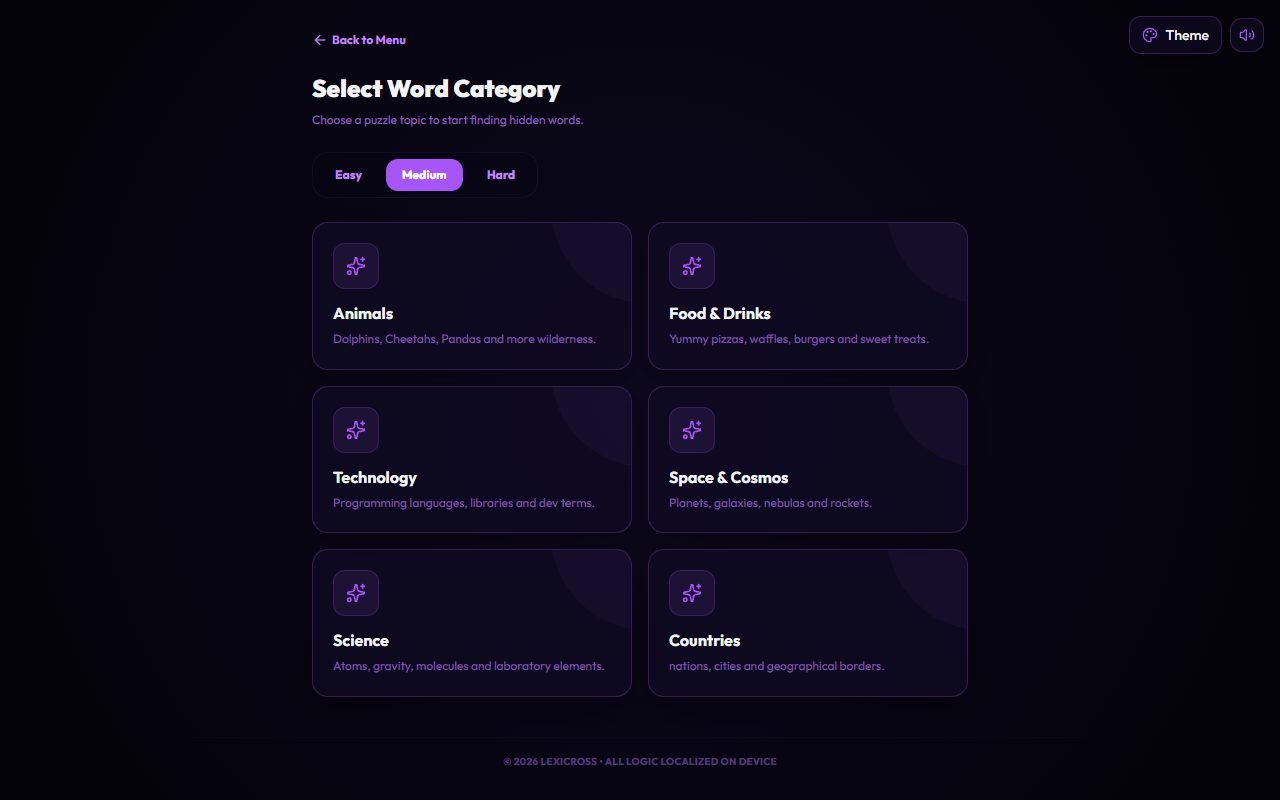
Press Play Game, choose Easy, Medium or Hard from the bar at the top, then pick one of six categories:
| Category | What's in it |
|---|---|
| Animals | Dolphins, cheetahs, pandas and more |
| Food & Drinks | Pizzas, waffles, burgers and sweet treats |
| Technology | Programming languages and developer terms |
| Space & Cosmos | Planets, galaxies, nebulas and rockets |
| Science | Atoms, gravity, molecules and the lab |
| Countries | Nations from around the world |
Each category has a pool of more than 200 words, and every new puzzle picks a fresh selection and builds a fresh grid, so you won't see the same puzzle twice in a row.
2. Know your grid
The difficulty sets the grid size, the number of words, how long they are and which way they can run:
| Difficulty | Grid | Words | Word length | Directions |
|---|---|---|---|---|
| Easy | 8×8 | 6 | 3 to 6 letters | Left to right and top to bottom only |
| Medium | 12×12 | 8 | 4 to 9 letters | Adds backwards (right to left) and upwards |
| Hard | 15×15 | 12 | 5 to 12 letters | All eight directions, including diagonals |
So on Medium you never need to look diagonally, and on Easy every word reads the normal way. Hard is where words can hide in any direction.
3. Select words by dragging
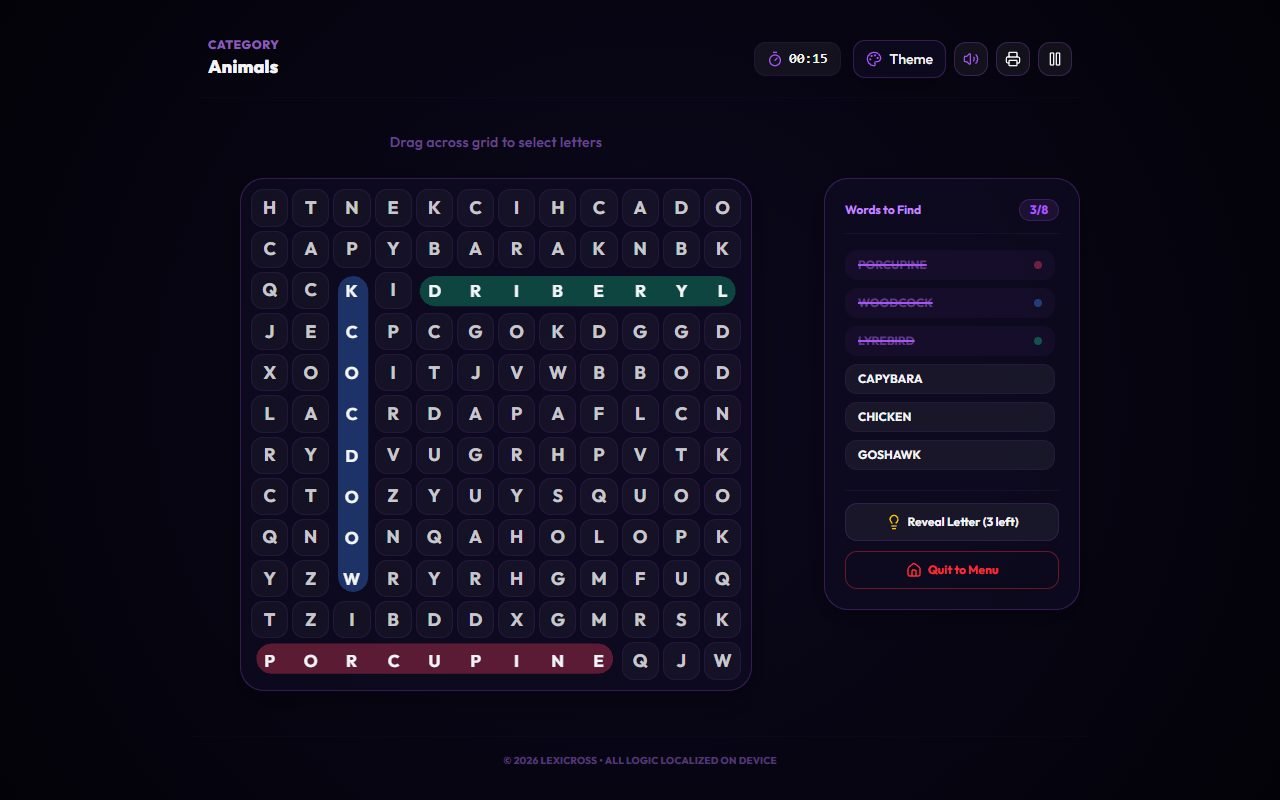
Click or touch the first letter of a word and drag to the last letter, then let go. Your selection snaps to a straight line, so you don't need to be precise. You can drag from either end: going from the last letter back to the first works too.
When you get one right, the word is highlighted in its own colour on the grid and crossed off the list. The counter at the top of the list shows how many you've found, for example 3/8.
4. Use the extra buttons
- Reveal Letter makes the first letter of a random word you haven't found glow for two seconds. You get three per puzzle, and the finish screen shows how many you used.
- Pause stops the timer and covers the grid, so no peeking.
- Theme switches between five colour themes: Midnight Neon, Aurora Forest, Sunset Gold, Sakura Blossom and Minimal Light. Your choice is remembered.
- The sound button mutes or unmutes the chimes.
- Quit to Menu ends the puzzle. Be warned that quitting resets your current winning streak.
Find every word and you get a Puzzle Solved! screen with your difficulty, your time and the hints you used.
5. Check your statistics
View Statistics shows games won, puzzles played, your current streak and your best streak, plus your best time for each category and difficulty. Beating your own best time on Hard is a good long-term goal.
Make your own word search
Lexicross has a built-in Board Maker for custom puzzles. It's ideal for spelling lists, birthday parties, team events or a puzzle full of family names.
- From the main menu, choose Create Custom Board.
- Give your puzzle a name (up to 40 characters).
- Choose the grid: Easy (8×8, up to 6 words), Medium (12×12, up to 8 words) or Hard (15×15, up to 12 words). The directions follow the same rules as the table above.
- Type each word and press + to add it. Words need at least 2 letters and can't be longer than the grid is wide. Spaces and punctuation are removed, so a phrase like "ice cream" becomes ICECREAM.
- Add at least 3 words, then press Generate to play.
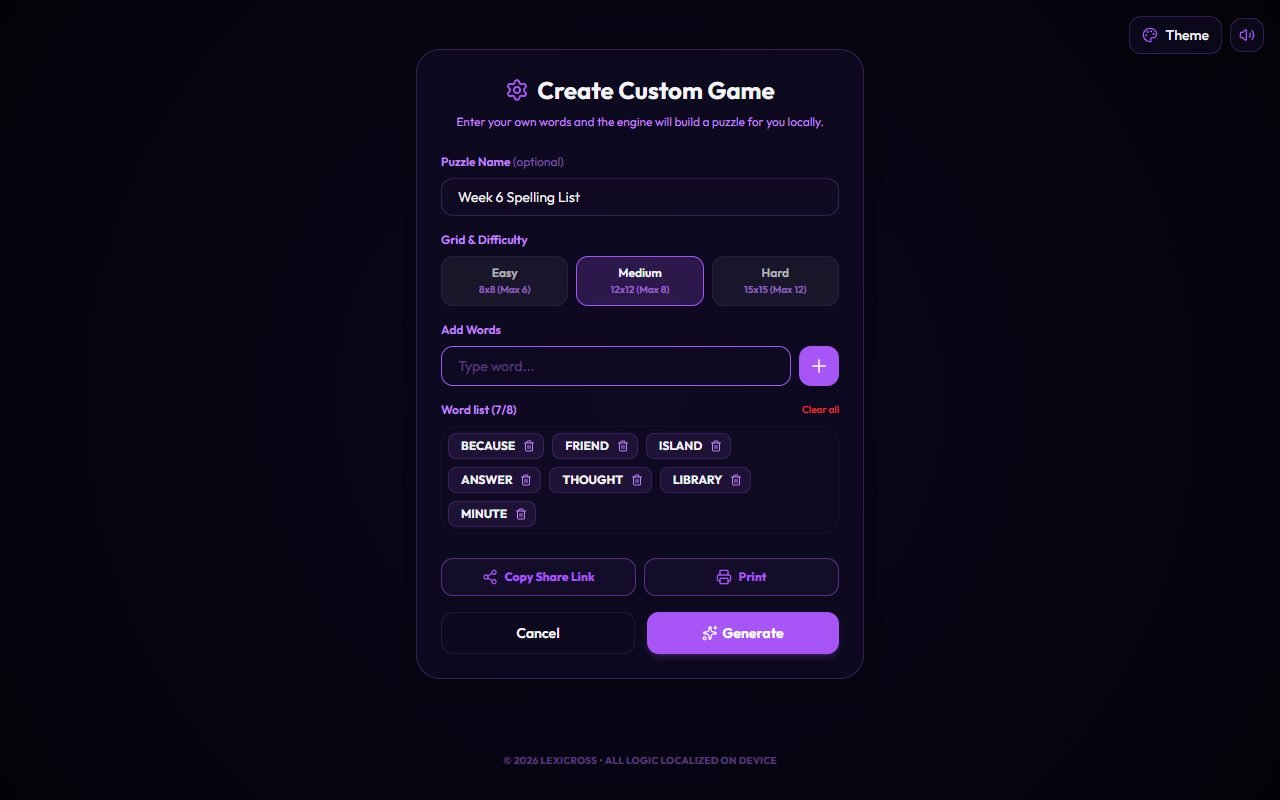
To share it, press Copy Share Link. Anyone who opens the link gets your puzzle in their own browser, with no sign-up. The link holds your word list, title and difficulty, and the grid is built fresh each time it's opened. So two people racing on the same link get the same words in a different layout.
How to print a word search
Every Lexicross puzzle can be printed, which makes it an easy source of free printable word search sheets:
- Start any puzzle, from a category or the Board Maker.
- Press the printer button at the top of the game.
- Choose Print puzzle, or Print with answer key to add a second page with every hidden word shaded.
The printed sheet shows the puzzle title, the difficulty, the grid size and the directions to look in, lines for a name and date, the letter grid and the word list in alphabetical order with tick boxes. In the Board Maker, the Print button builds your puzzle and prints it in one go.
Each print uses the grid on your screen at that moment. If a whole class needs the same layout, print one copy and photocopy it.
Word search tips: how to find words faster
Here are the techniques good players use. Try them one at a time until they become habits.
1. Pick the most distinctive letter in the word
Don't hunt for the first letter of every word by default. Look at the word and pick the letter that will be easiest to spot. In a printed puzzle that's often a Q, X, Z or J, because puzzle makers tend to fill grids with common letters.
In Lexicross the spare squares are filled with letters chosen at random, so every letter turns up as filler about equally often. Common letters like E, A and S still appear more, because the hidden words are full of them. So an unusual letter like Q, X, Z, J, K or V usually gives you fewer places to check. Letters with distinctive shapes, like W, M or Y, are also easier on the eye.
2. Scan for double letters
Words like COFFEE, BALLOON, GIRAFFE or SHEEP have a pair of the same letter together. Look for two identical letters side by side in the grid. Doubled letters jump out, and there are only a few in any grid, so they narrow your search fast.
3. Use first-and-last letter scanning
Find a copy of the word's first letter, then look the right distance away for the last letter. For a seven-letter word, the last letter will be six squares away in a straight line. If it isn't there in any direction, move on to the next copy of the first letter. This is much faster than reading every letter in between.
4. Sweep row by row
Rather than letting your eyes wander, work through the grid one row at a time, left to right, looking for one target letter. Each time you find it, check the directions allowed on that difficulty. A steady sweep makes sure you never miss a spot, and it's surprisingly quick once you get into a rhythm.
5. Search for two letters, not one
A single letter appears all over the grid. A pair of letters that start the word, like "QU", "PH" or "TH", appears far less often. Scan for the first two letters together and you'll get fewer false starts.
6. Remember backwards and diagonal words
On Medium and Hard, words can run right to left and bottom to top, and on Hard they can also run diagonally. These are where most people get stuck. If you've swept a row and found nothing, read it backwards. If a word still won't show itself on Hard, check the diagonals from each copy of its rarest letter.
7. Find the long words first
Long words are easier to spot than short ones because they cover more of the grid and there are fewer places they can fit. Finding them early also removes letters from play, which leaves fewer places for the short words to hide.
8. Save the Reveal Letter hints for the end
You only get three, so keep them for the last one or two words. At that point a glowing first letter usually finishes the puzzle in seconds.
Word search for kids, classrooms and seniors
Word searches suit almost anyone, and they're a calm, screen-light activity when printed.
For children. The Easy grid is a good first puzzle: an 8×8 square, six short words and every word reading left to right or top to bottom, the same way children learn to read. Making a word search with the Board Maker from a child's own spelling words is a gentle way to practise them, because they see each word several times while they hunt for it.
For classrooms. Teachers can build a puzzle from this week's vocabulary, share the link on a class page or print it with an answer key for quick marking. A Medium grid with 6 to 8 words is a comfortable size for a short warm-up or an early-finisher activity. For a seasonal option, see our Halloween word search puzzles.
For seniors. Many people enjoy word searches as a relaxing daily habit. They ask for focus, patience and careful scanning, and printing on paper means larger, easy-to-read letters. They're best thought of as an enjoyable pastime rather than a medical brain-training tool, but a puzzle that keeps you looking closely for ten minutes is time well spent.
Frequently asked questions
How do you play word search? Look at the list of words, then find each one hidden in the grid of letters. Words run in straight lines and may go across, down, backwards, upwards or diagonally, depending on the difficulty. In Lexicross, drag from the first letter to the last letter to select a word. Find them all to win.
What is the best word search strategy? Pick the most distinctive letter in each word, sweep the grid row by row for it, then check the allowed directions from each hit. Look for double letters, start with the longest words, and remember to read rows backwards on harder puzzles.
Can words go diagonally or backwards? In Lexicross it depends on the difficulty. Easy only uses left to right and top to bottom. Medium adds backwards and upwards. Hard uses all eight directions, including diagonals in both directions.
Is Lexicross free word search online? Yes. Lexicross is free to play in your browser on a computer, tablet or phone, with no download and no account.
Can I make a printable word search? Yes. Use Create Custom Board to enter your own words, then press Print. You can also press the printer button during any puzzle and choose Print puzzle or Print with answer key.
How many words can I put in a custom word search? Between 3 and 6 words on Easy, up to 8 on Medium and up to 12 on Hard. Each word must have at least 2 letters and fit across the grid (8, 12 or 15 letters at most).
Can I share my word search with friends? Yes. Press Copy Share Link in the Board Maker and send the link by message, email or a class page. It opens your puzzle in their browser. Each person gets a freshly built grid with the same words.
Are word searches good for your brain? They're a good way to practise focus, attention to detail, spelling and visual scanning, and many people find them relaxing. Like any puzzle, they're best enjoyed for their own sake.
Quick checklist
- Choose a difficulty that matches the directions you want to search.
- Pick the most distinctive letter in each word, not just the first.
- Look for double letters and letter pairs.
- Sweep row by row so you never miss a spot.
- Use first-and-last letter scanning to check a hit quickly.
- On Medium and Hard, read backwards. On Hard, check the diagonals.
- Find the long words first.
- Keep your Reveal Letter hints for the last words.
Want more calm puzzles? Try our guides to Binairo, Sudoku and Klondike Solitaire.
Ready to start hunting? Play Lexicross Word Search free in your browser, or make and print your own puzzle in two minutes.
Ready to play Lexicross Word Search?
Free in your browser — no download, no account.
▶ Play Lexicross Word Search